Hytale Server Management
HyOS - Hytale Server Manager
A Docker-based Hytale dedicated server management ecosystem. One command to deploy, authenticate, and manage your server with a full web dashboard, mod support, and automated updates.
Install HyOS
Choose your deployment method, then follow the steps below.
- Create a dataset for server data in your TrueNAS UI
- Set dataset ACL permissions: User 568, Group 568
- Open the TrueNAS web UI and go to Apps
- Click Discover Apps (top-right)
- Click the 3 dots in the top right
- Select Install via YAML
- Paste the YAML below into the editor
- Update /mnt/tank/apps/hytale to your dataset path (both services)
- Replace changeme123 with a secure API password
- Adjust memory settings based on your system (minimum 8GB recommended)
- Click Save
- Game Server will be available on: UDP port 30380
- Management UI will be available on: http://your-truenas-ip:30382
x-api-config: &api-config
  # REQUIRED: Set your management API password (minimum 8 characters)
  API_CLIENT_SECRET: ${API_CLIENT_SECRET:-changeme123}
  API_CLIENT_ID: ${API_CLIENT_ID:-hyos-manager}

services:
  hyos-server:
    image: ghcr.io/editmysave/hyos/server:latest
    pull_policy: always
    container_name: hyos-server
    user: "568:568"
    restart: unless-stopped
    stdin_open: true
    tty: false

    environment:
      <<: *api-config
      PUID: 568
      PGID: 568
      UMASK: "002"
      TZ: ${TZ:-UTC}
      JAVA_XMS: ${JAVA_XMS:-1G}
      JAVA_XMX: ${JAVA_XMX:-3G}
      USE_ZGC: "false"
      G1_MAX_PAUSE: "200"
      SERVER_PORT: "5520"
      PATCHLINE: ${PATCHLINE:-release}
      ENABLE_AOT: "true"
      AUTO_UPDATE: ${AUTO_UPDATE:-false}
      VERSION_CHECK_ENABLED: ${VERSION_CHECK_ENABLED:-true}
      VERSION_CHECK_INTERVAL: ${VERSION_CHECK_INTERVAL:-3600}
      SKIP_CONFIG_GENERATION: "false"
      SERVER_NAME: ${SERVER_NAME:-Hytale Server}
      SERVER_MOTD: ${SERVER_MOTD:-}
      SERVER_PASSWORD: ${SERVER_PASSWORD:-}
      MAX_PLAYERS: ${MAX_PLAYERS:-100}
      MAX_VIEW_RADIUS: "32"
      DEFAULT_WORLD: ${DEFAULT_WORLD:-default}
      DEFAULT_GAMEMODE: ${DEFAULT_GAMEMODE:-Adventure}
      LOCAL_COMPRESSION: "false"
      DISPLAY_TMP_TAGS: "false"
      PLAYER_STORAGE_TYPE: "Hytale"
      WHITELIST_ENABLED: ${WHITELIST_ENABLED:-false}
      HYTALE_ACCEPT_EARLY_PLUGINS: "false"
      HYTALE_ALLOW_OP: "false"
      HYTALE_BACKUP: "true"
      HYTALE_BACKUP_FREQUENCY: "30"
      HYTALE_DISABLE_SENTRY: "false"
      API_ENABLED: "true"
      API_PORT: "8080"
      API_WEBSOCKET_ENABLED: "true"
      API_WEBSOCKET_STATUS_INTERVAL: "1"
      API_REGENERATE_CONFIG: "true"
      DEBUG: "false"
      NO_COLOR: "false"
    ports:
      # UDP port for Hytale QUIC protocol (game traffic)
      - "30380:5520/udp"
      - "30381:8080/tcp"
    volumes:
      # IMPORTANT: Update the host path to your TrueNAS dataset this holds your (world, config, mods, backups, auth)
      - /mnt/tank/apps/hytale:/data:rw

    healthcheck:
      test: ["CMD", "/opt/scripts/healthcheck.sh"]
      interval: 30s
      timeout: 10s
      retries: 3
      start_period: 15s

    # Graceful shutdown
    stop_grace_period: 30s

    # Logging - limit log size
    logging:
      driver: json-file
      options:
        max-size: "50m"
        max-file: "3"

    # Security
    security_opt:
      - no-new-privileges:true
  hyos-manager:
    image: ghcr.io/editmysave/hyos/manager:latest
    pull_policy: always
    container_name: hyos-manager

    # Run as TrueNAS apps user
    user: "568:568"
    # Add root group for Docker socket access (socket is 0:0 with 660 permissions)
    group_add:
      - "0"

    restart: unless-stopped

    environment:
      # Inherit shared API config (same password as server)
      <<: *api-config
      # Map to REST adapter env var names
      REST_API_CLIENT_SECRET: ${API_CLIENT_SECRET:-changeme123}
      REST_API_CLIENT_ID: ${API_CLIENT_ID:-hyos-manager}

      # Adapter configuration
      ADAPTER_TYPE: rest
      HYTALE_CONTAINER_NAME: hyos-server
      HYTALE_STATE_DIR: /data/.state
      HYTALE_SERVER_HOST: hyos-server
      HYTALE_SERVER_PORT: "8080"

      # Node environment
      NODE_ENV: production
      COOKIE_SECURE: "false"

    # Web UI port
    ports:
      - "30382:3000"

    # Volume mounts
    volumes:
      # Shared data directory (for state files and world management)
      - /mnt/tank/apps/hytale:/data:rw
      - /var/run/docker.sock:/var/run/docker.sock:ro
    depends_on:
      - hyos-server
    healthcheck:
      test: ["CMD", "wget", "--no-verbose", "--tries=1", "--spider", "http://127.0.0.1:3000/api/health"]
      interval: 30s
      timeout: 10s
      retries: 3
      start_period: 60s
    logging:
      driver: json-file
      options:
        max-size: "10m"
        max-file: "3"

    security_opt:
      - no-new-privileges:true

networks:
  default:
    driver: bridge
Screenshots
What it looks like
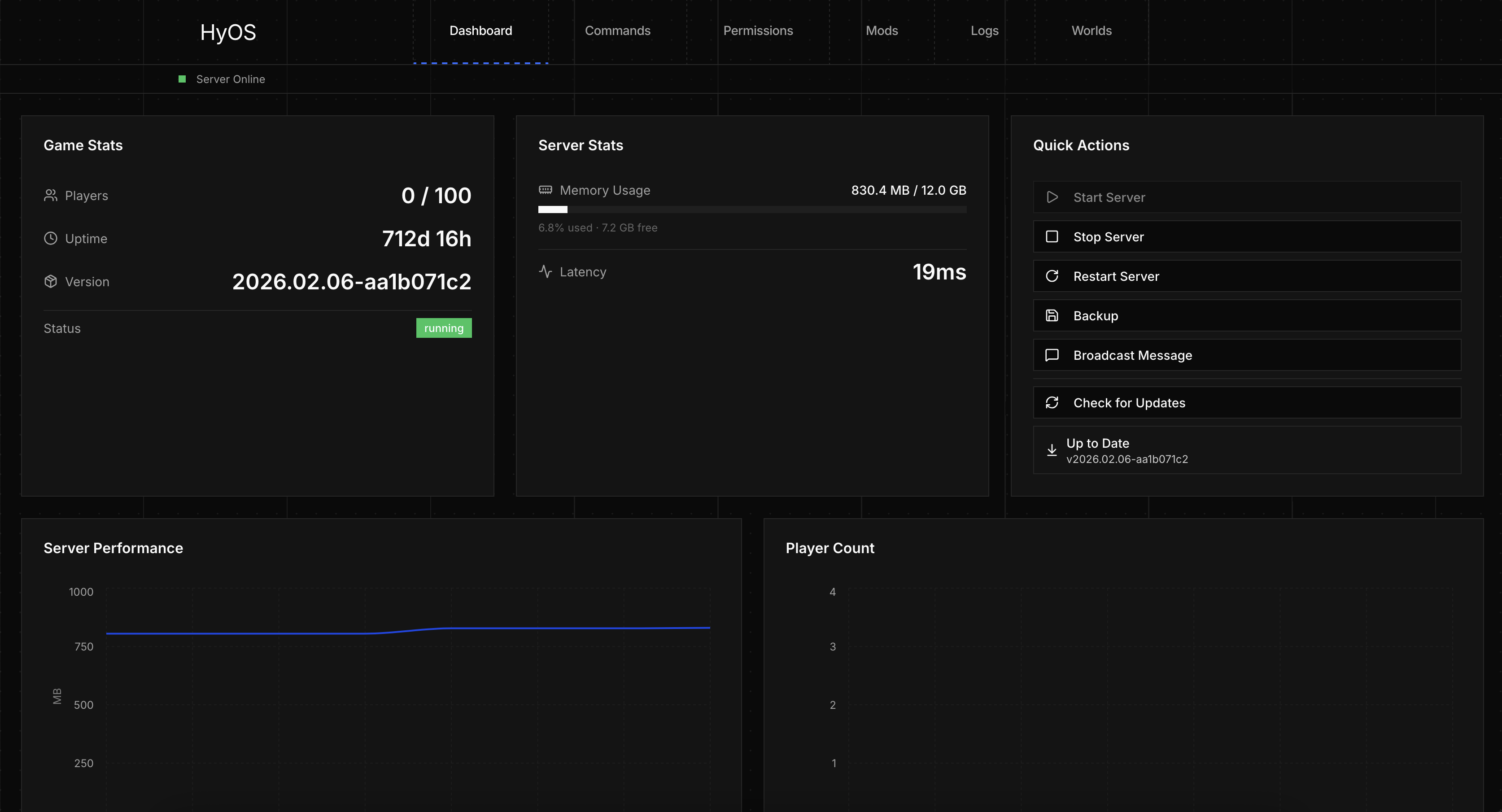
Server Dashboard
- Real-time server stats and performance graphs
- Quick actions: start, stop, restart, backup
- Player count, memory usage, and uptime tracking
What you can do with it
Everything you need to run and manage a Hytale dedicated server.
Easy server setup
Single Docker Compose file to deploy a fully configured Hytale dedicated server with automatic authentication.
Mod management
Install mods from CurseForge, NexusMods, or ModTale. Upload custom JARs with automatic manifest validation.
Live console
Stream server logs in real-time and execute commands directly from the web dashboard.
World management
Upload worlds, browse the file system, and switch between world slots through an intuitive UI.
Docker networking
Isolated container networking with configurable port mapping and bridge network support.
Server monitoring
Health checks, resource usage tracking, and automated restart policies to keep your server running.
Get involved
HyOS is open source. Contributions, issues, and feedback are welcome.
Get in touch
Have a question or found a bug? Reach out or open a GitHub issue.